
What Is Internet Jitter? Meaning, Causes, Ideal Range & How to Fix It
Internet speed isn’t the only factor that affects your online experience. Even with fast broadband, you may still face lag, buffering, or broken audio. One common reason behind this is internet jitter.
Understanding jitter can help you fix unstable connections and improve everything from video calls to gaming.
What Is Internet Jitter?
Internet jitter is the variation in time delay between data packets traveling over a network, which causes inconsistent and unstable internet performance.
In simple terms, jitter means:
- Data does not arrive evenly.
- Some packets are delayed more than others.
- This results in lag, stuttering, or interruptions.
Jitter vs Ping vs Latency
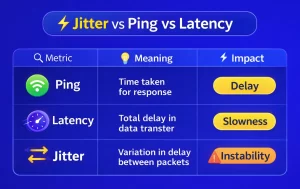
👉 Even with low ping, high jitter can still cause poor performance.
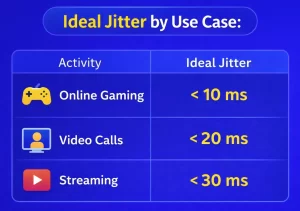
What Is a Good Jitter Speed?
- Excellent: Less than 10 ms
- Good: 10–20 ms
- Acceptable: 20–30 ms
- Poor: Above 30 ms
Ideal Jitter by Use Case:
Why Internet Jitter Matters
Jitter mainly affects real-time activities, where timing is critical.
Real-Life Impact:
- Video Calls / Online Classes
Voice breaks, audio overlaps, screen freezes - Online Gaming
Lag spikes, delayed reactions - Streaming (OTT Platforms)
Buffering and sudden quality drops - Work from Home
Interrupted meetings and unstable connections
👉 Example: If your Zoom call audio cuts out randomly despite good speed, jitter is likely the issue.
What Causes Internet Jitter?
Several factors can lead to jitter:
Main Causes:
- Network congestion (too many users or devices)
- Weak or unstable WiFi signal
- Outdated or low-quality router
- Wireless interference (walls, electronics)
- ISP network issues
How to Test Internet Jitter
You can measure jitter easily using online tools.
Steps:
- Open a speed test website (like Speedtest or Cloudflare)
- Run the test.
- Check the “Jitter” value in the results.
👉 Test at different times of the day for accuracy.
How to Fix Internet Jitter (Step-by-Step)
Quick Fix Guide:
- Use a wired (Ethernet) connection.
- Restart your router.
- Reduce background downloads.
- Upgrade your internet plan.
- Replace old routers with modern ones.
- Enable QoS (Quality of Service) settings.
Advanced Tips to Reduce Jitter
- Choose fiber internet for home for better stability.
- Place your router centrally and at an elevated position.
- Use dual-band or mesh WiFi systems.
- Limit the number of connected devices during important tasks.
Fiber vs WiFi: Which Is Better for Jitter?
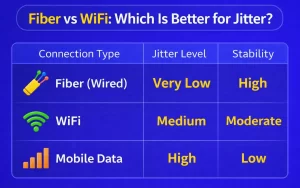
👉 Fiber connections offer the most stable performance with minimal jitter.
Common Mistakes to Avoid
- Choosing low-speed plans for multiple users
- Ignoring router quality
- Placing the router in corners or behind walls
- Overloading the network with too many devices
Frequently Asked Questions (FAQ)
What is internet jitter in simple terms?
Inconsistency in data delivery timing is the primary cause of unstable internet performance.
What is a good jitter speed?
A good jitter value is below 20 ms, while under 10 ms is considered excellent.
What causes internet jitter?
It is caused by network congestion, weak WiFi signals, outdated hardware, or ISP issues.
How do I fix internet jitter?
Use a wired connection, upgrade your router, reduce network load, and consider switching to fibre internet if possible.
Is jitter more important than ping?
For real-time activities like video calls and gaming, jitter can impact performance more than ping.
Does WiFi increase jitter?
Yes, WiFi can introduce more jitter due to interference and signal instability.
Final Thoughts
Internet jitter is one of the most overlooked reasons for poor connectivity. While speed is important, stability is what truly defines a good internet experience.
By understanding jitter, monitoring your connection, and applying the right fixes, you can significantly improve performance for online classes, gaming, streaming, and remote work.